
Test plays a vital role in any types of software development to ensure the deliverable is robust and bug free. Magento 1(M1) comes with NO test suite and unit testing M1 codebase is considered as a nightmare. Good idea, but no one do it:( So you never see any M1 modules come with a test suite. Sad but understandable. Fortunately Magento 2(M2) offers testing support out of the box, which I consider is one of the biggest features over M1 (together with a better support for web APIs). So here is how to unit test M2 classes.
Configuration
In M2, there are multiple test types and they are in [M2 ROOT DIR]/dev/tests, for Magento 2.2, the directory structure looks like this,

We can see there are multiple different types of test we can write and run, even including the frontend js test. Unit test is the one which developers should mostly deal with as we write codes. Under the unit directory, make the phpunit.xml file based on the default phpunit.xml.dist. Phpunit.xml is the configuration file that PHPUnit will read to execute the test cases. I just updated the basic settings like timezone and memory limit in case it runs out of memory.
Once that is done, we should be able to run the unit tests that come with M2 in the command line. Go to the Magento root directory and run this,
vendor/bin/phpunit -c dev/tests/unit/phpunit.xml
PHPUnit should run through all the tests officially coming with Magento 2.2 so you will see something like this,

There are 20552 test cases! Although there are some failed test cases and errors , remember it comes from ZERO in M1, that is a big effort from Magento indeed. So we are good to start unit testing.
Writing the Test
First thing first, where to put our test files? In this phpunit.xml file, it specifies the directories that PHPUnit will go and look for test cases.
    <testsuite name="Magento Unit Tests">
        <directory suffix="Test.php">../../../app/code/*/*/Test/Unit</directory>
        <directory suffix="Test.php">../../../lib/internal/*/*/Test/Unit</directory>
        <directory suffix="Test.php">../../../lib/internal/*/*/*/Test/Unit</directory>
        <directory suffix="Test.php">../../../setup/src/*/*/Test/Unit</directory>
        <directory suffix="Test.php">../../../vendor/*/module-*/Test/Unit</directory>
        <directory suffix="Test.php">../../../vendor/*/framework/Test/Unit</directory>
        <directory suffix="Test.php">../../../vendor/*/framework/*/Test/Unit</directory>
        <directory suffix="Test.php">./*/*/Test/Unit</directory>
    </testsuite>
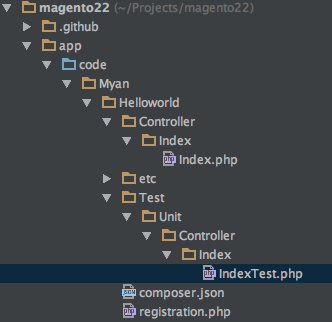
This line <directory suffix="Test.php">../../../app/code/*/*/Test/Unit</directory> tells PHPUnit to search any modules under app/code and find Test/Unit directory for test cases(class name with suffix ‘Test’.). So we need to put unit test files under the Test/Unit directory of our module for them to be found and executed by PHPUnit. We can define other directories but it makes senses to me so I just follow the convention.
Here I use the hello world module I created in this post. In the previous post, I created a simple hello world controller that just echos out ‘Hello world.’ in JSON format. So I need to create a test case for this controller. It is recommended to mimic the original file path of the class to be tested in the test suite. So my unit test file is in Test/Unit/Controller/Index/IndexTest.php
<?php
/**
 * Created by PhpStorm.
 * User: mingyan
 * Date: 15/7/18
 * Time: 1:12 PM
 */

namespace Myan\Helloworld\Test\Unit\Controller\Index;

class IndexTest extends \PHPUnit\Framework\TestCase
{
  protected $controller;
  protected $resultJsonFactory;

  public function setUp()
  {

    $objectManager = new \Magento\Framework\TestFramework\Unit\Helper\ObjectManager($this);
    $jsonResult = $objectManager->getObject('Magento\Framework\Controller\Result\Json');

    $this->resultJsonFactory = $this->getMockBuilder('Magento\Framework\Controller\Result\JsonFactory')
      ->disableOriginalConstructor()
      ->getMock();

    $this->resultJsonFactory->method('create')->willReturn($jsonResult);

    $this->controller = $objectManager->getObject(
      '\Myan\Helloworld\Controller\Index\Index',
      ['resultJsonFactory' => $this->resultJsonFactory]
    );

    parent::setUp(); // TODO: Change the autogenerated stub
  }

  public function testIndex()
  {

    $result = $this->controller->execute();

    $this->assertInstanceOf('\Magento\Framework\Controller\Result\Json', $result);
  }
You can see the actual test assertion is pretty simple. It calls the execute method and verify that the controller action returns a JSON result class which is a type of \Magento\Framework\Controller\Result\Json. That’s it. A lot of effort was involved in mocking the dependencies for the test case. So more code goes into function setUp(). The original controller action class has these dependencies which are injected in the constructor.
  public function __construct(
    \Magento\Framework\App\Action\Context $context,
    \Magento\Framework\Controller\Result\JsonFactory $resultJsonFactory
  ) {
    $this->resultJsonFactory = $resultJsonFactory;
    parent::__construct($context);
  }
Since I only care about the execute function that we are testing. As long as we can ‘cheat’ and run the function and get the result for verification, that is OK. So here I use the Magento ObjectManager (but the test version) from \Magento\Framework\TestFramework\Unit\Helper\ObjectManager to get us the real class for me to mock on. I create a fake JsonFactory which gave me a Json result class when the method create was called. I then pass this fake factory class to the ObjectManager and map it to the dependency named ‘resultJsonFactory’. The ObjectManager replaces the original dependency with this fake class and returns me the controller action class. So that is how I get the controller ready for test.
So ideally it should be easy to test classes without dependencies and fewer dependencies, the easier to test. That is also mentioned in Magento documentation about writing testable code.
Running the test
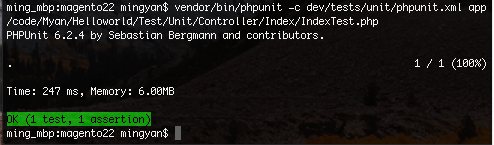
We can now run our test. We can just run vendor/bin/phpunit -c dev/tests/unit/phpunit.xml, but it will run through all 20552 Magento tests on top of our little simple test and it is just too slow and unnecessary. So we just pass the test case file to PHPUnit like this,
vendor/bin/phpunit -c dev/tests/unit/phpunit.xml app/code/Myan/Helloworld/Test/Unit/Controller/Index/IndexTest.php
You can see the output like this,
Thoughts
Magento 2 provides this really good support for writing unit tests with PHPUnit class mocking and Magento DI to swap out real classes. I think Magento developers should really make use of this great tooling to deliver better quality code. Hopefully we can see more Magento 2 modules come with test suites and better code coverage. In my opinion, developers should be responsible for the code they write and automated test files are there to give them more confidence on their code.
On the other hand, it surely adds some overhead and time and effort to the development. That is why I can see in the real world, there are still not many Magento 2 modules having the Test directory included. It might take some time for Magento developers to get used to this(There used to be no such thing called automated testing in Magento 1). It also depends on how the code was written. Write better code, testable code. Anyway, writing good quality code is not a easy job. With the available tools and frameworks like PHPUnit, Selenium, BDD and TDD, I think developers should make use of them for better software.

 Ming's Notebook